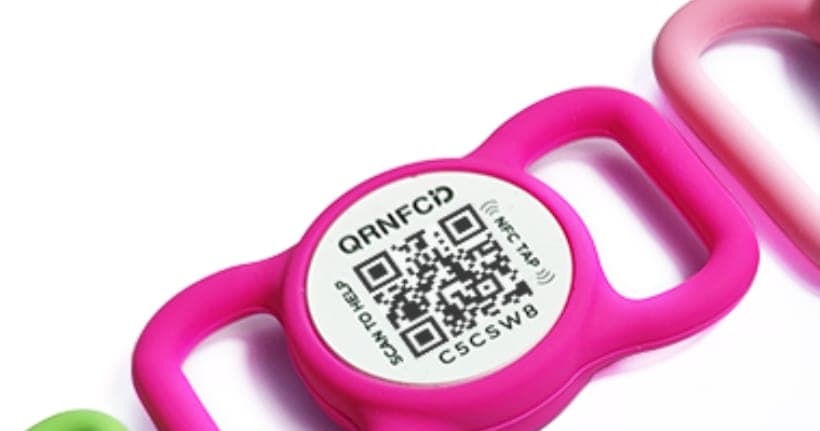
What's actually inside one of these tags
Picture a small, smart QR and NFC ID tag clipped to the collar. On one side you've got a printed QR code, that black-and-white square you'll know from receipts and menus. Underneath the surface sits the other half of the story: an NFC chip. It's the same sort of chip you use to pay with your phone at the till. Both lead to exactly the same place, which is your pet's profile online.
The tag itself holds no details about your dog or cat. No name, no phone number sitting on the metal. All it stores is one short web address, unique to your particular animal. So the day you change your number or move house, you swap nothing. The tag stays put, and you just update the details from your phone.
Step by step, when your dog goes missing
Start with your part, which takes a few minutes. You set up a free account and fill in your pet's profile. Pop in the name, add a photo, flag whether your dog takes medication or is nervous around strangers, and say how a finder can reach you fastest. Then you clip the tag to the collar and forget about it for years.
Now jump to the bad day. Your cat has slipped out through a window left ajar, and two days later a neighbour finds her three streets over. The stranger spots the tag. They point their phone camera at the code, or, if their phone has NFC, they simply tap it against the tag. In a heartbeat their browser opens on your cat's profile.
The finder sees your pet's little face, her name and a button that rings you straight away. They install nothing, they set up no account, they copy no number off the metal. One tap, and you hear down the line that your animal is safe and well.
Why there's nothing to install and nothing to charge
The real strength of the tag is how little it asks of anyone. Nearly every phone camera these days reads QR codes out of the box, so the finder hunts for no app. Reading the NFC chip works at the system level too, again with no download. That matters, because the person holding your frightened dog by a busy road has neither the time nor the patience to sign up for anything.
The NFC chip is passive. That sounds technical, but it just means there's no battery in it. The phone that comes close powers it for a split second. Nothing goes flat at the worst possible moment, and there's nothing to charge for the whole of your pet's life. The tag is water-resistant on top of that, so rain, snow and a good roll in a muddy puddle leave it none the worse.
And what about your privacy
Plenty of owners worry that a stranger who scans the code will see their home address. That isn't how it works here. You decide what the finder gets to see. You can show your dog's name and a contact button while keeping your exact address hidden. Contact can run through a form, or through a call where your own number needn't be shown outright.
When your pet is back home, one tap switches off the lost mode. The profile goes back to showing only what you want it to day to day. The whole time, you're the one in control, not some passer-by with a phone.